Basic PIM configuration on Cisco
Multicast relies on unicast reachability for reverse path forwarding (RPF). Check the unicast routes before troubleshooting PIM.
1. Static RP
In PIM Sparse Mode, a static rendezvous point (RP) provides a simple starting point for Any-Source Multicast (ASM). Use the same group-to-RP mapping on all participating routers, including the RP. A small network can pair static mappings with MSDP-based Anycast-RP for redundancy.
1.1. Static RP on IOS

Enable IPv4 multicast routing.
ip multicast-routing
Enable PIM on the routed links and loopbacks used in the lab.
interface Loopback0
 ip address 2.2.2.2 255.255.255.255
 ip pim sparse-mode
!
interface Ethernet0/0
 ip address 24.1.1.2 255.255.255.0
 ip pim sparse-mode
!
interface Ethernet0/1
 ip address 12.1.1.2 255.255.255.0
 ip pim sparse-mode
Use the IGP to make the RP address reachable.
router ospf 1
 router-id 1.1.1.1
 network 0.0.0.0 255.255.255.255 area 0
Configure the static RP.
ip pim rp-address 1.1.1.1
Check that the RP mapping shows Static.
R1#show ip pim rp mapping
PIM Group-to-RP Mappings
Group(s): 224.0.0.0/4, Static
    RP: 1.1.1.1 (?)
1.2. Static RP on IOS XR
Enable multicast routing and establish unicast reachability. This example uses R1.
hostname R1
interface Loopback0
 ipv4 address 1.1.1.1 255.255.255.255
!
interface GigabitEthernet0/0/0/0
 ipv4 address 13.1.1.1 255.255.255.0
!
interface GigabitEthernet0/0/0/1
 ipv4 address 12.1.1.1 255.255.255.0

router ospf 1
 router-id 1.1.1.1
 address-family ipv4
 area 0
  network point-to-point
  interface Loopback0
  !
  interface GigabitEthernet0/0/0/0
  !
  interface GigabitEthernet0/0/0/1
  !
 !
!
multicast-routing
 address-family ipv4
  interface Loopback0
   enable
  !
  interface GigabitEthernet0/0/0/0
   enable
  !
  interface GigabitEthernet0/0/0/1
   enable
Enable PIM.
router pim
 address-family ipv4
  interface Loopback0
  !
  interface GigabitEthernet0/0/0/0
   enable
  !
  interface GigabitEthernet0/0/0/1
   enable
Configure the static RP.
RP/0/0/CPU0:R1(config)#router pim
RP/0/0/CPU0:R1(config-pim)#address-family ipv4
RP/0/0/CPU0:R1(config-pim-default-ipv4)#rp-address 1.1.1.1 ?
  WORD      Access list of groups that should map to given RP
  bidir     Specify keyword bidir to configure a bidir RP
  override  Static RP config overrides auto-rp and BSR
  <cr>
RP/0/0/CPU0:R1(config-pim-default-ipv4)#rp-address 1.1.1.1
2. Dynamic RP discovery
2.1. Auto-RP
Auto-RP is a Cisco mechanism for distributing RP mappings. A candidate RP announces its group ranges to 224.0.1.39. A mapping agent selects an RP and publishes the mapping to 224.0.1.40. For identical group ranges, the mapping agent selects the candidate with the higher address. A router can perform both roles.
Dynamic discovery reduces the work of maintaining mappings. For redundancy, deploy multiple candidates and keep the underlying routes reachable. Auto-RP uses the send-rp-announce command for candidates and send-rp-discovery for mapping agents. Use the scope value to control how far messages travel.
2.1.2. Auto-RP on IOS
Establish the IGP routes first.
router ospf 1
 router-id [loopback-port-IP]
 network 0.0.0.0 255.255.255.255 area 0
Configure Auto-RP on R1 and R2.
ip pim autorp listener
ip pim send-rp-announce Loopback0 scope 255 group-list 1 interval 15
ip pim send-rp-discovery Loopback0 scope 255 interval 15
access-list 1 permit 239.0.0.0 0.255.255.255
R3 and R4 have similar settings. The following example shows R4.
R4
ip multicast-routing
ip cef
!
interface Loopback0
 ip address 4.4.4.4 255.255.255.255
 ip pim sparse-mode
!
interface Ethernet0/0
 ip address 24.1.1.4 255.255.255.0
 ip pim sparse-mode
 duplex auto
!
router ospf 1
 router-id 4.4.4.4
 network 0.0.0.0 255.255.255.255 area 0
!
ip pim autorp listener
Verify the learned RP mapping.
R1#show ip pim rp mapping
PIM Group-to-RP Mappings
This system is an RP (Auto-RP)
This system is an RP-mapping agent (Loopback0)

Group(s) 239.0.0.0/8
  RP 2.2.2.2 (?), v2v1
    Info source: 2.2.2.2 (?), elected via Auto-RP
         Uptime: 00:12:08, expires: 00:00:36
  RP 1.1.1.1 (?), v2v1
    Info source: 1.1.1.1 (?), via Auto-RP
         Uptime: 00:13:06, expires: 00:00:38
2.1.3. Auto-RP on IOS XR
Enable multicast forwarding and verify IGP reachability on R1.
hostname R1
interface Loopback0
 ipv4 address 1.1.1.1 255.255.255.255
!
interface GigabitEthernet0/0/0/0
 ipv4 address 13.1.1.1 255.255.255.0
!
interface GigabitEthernet0/0/0/1
 ipv4 address 12.1.1.1 255.255.255.0

router ospf 1
 router-id 1.1.1.1
 address-family ipv4
 area 0
  network point-to-point
  interface Loopback0
  !
  interface GigabitEthernet0/0/0/0
  !
  interface GigabitEthernet0/0/0/1
  !
 !
!
multicast-routing
 address-family ipv4
  interface Loopback0
   enable
  !
  interface GigabitEthernet0/0/0/0
   enable
  !
  interface GigabitEthernet0/0/0/1
   enable
Configure the RP roles on R1 and R2 using each router’s own interface addresses. The snippet references a group list named 224-4. Define that list and verify the permitted group range before reproducing the lab.
router pim
 address-family ipv4
  auto-rp mapping-agent Loopback0 scope 255 interval 60
  auto-rp candidate-rp Loopback0 scope 255 group-list 224-4 interval 60
  interface Loopback0
  !
  interface GigabitEthernet0/0/0/0
   enable
  !
  interface GigabitEthernet0/0/0/1
   enable
Verify the RP mapping from another router.
R3
RP/0/0/CPU0:R3#show pim rp mapping
Tue Jul  7 15:22:53.505 UTC
PIM Group-to-RP Mappings
Group(s) 224.0.0.0/4
  RP 2.2.2.2 (?), v2
    Info source: 1.1.1.1 (?), elected via autorp
      Uptime: 00:00:13, expires: 00:02:52
Group(s) 224.0.0.0/4
  RP 1.1.1.1 (?), v2
    Info source: 1.1.1.1 (?), elected via autorp
      Uptime: 00:00:11, expires: 00:02:48
RP/0/0/CPU0:R3#

R4
RP/0/0/CPU0:R4#show ip pim rp map
Tue Jul  7 15:24:34.968 UTC
PIM Group-to-RP Mappings
Group(s) 224.0.0.0/4
  RP 2.2.2.2 (?), v2
    Info source: 1.1.1.1 (?), elected via autorp
      Uptime: 00:01:54, expires: 00:02:11
Group(s) 224.0.0.0/4
  RP 1.1.1.1 (?), v2
    Info source: 1.1.1.1 (?), elected via autorp
      Uptime: 00:01:51, expires: 00:01:08
RP/0/0/CPU0:R4#
2.1.4. Auto-RP on NX-OS
The original lab has no NX-OS configuration for this section.
2.2. Bootstrap Router (BSR)
Candidate BSRs elect a bootstrap router. The highest priority wins, with the highest address as the tiebreaker. Candidate RPs send unicast advertisements to the elected BSR. It distributes the candidate set in Bootstrap messages, which PIM neighbors process and relay hop by hop.
A router checks that a Bootstrap message came from the RPF neighbor toward the BSR before relaying it. For each multicast group, the router selects the longest matching group prefix, then the lowest candidate RP priority, then the highest hash value and highest RP address. Routers with the same candidate set can make the same selection. RFC 5059
Use the bsr-candidate and rp-candidate commands to configure the two roles.
2.2.2. BSR on IOS
Establish IGP reachability.
router ospf 1
 router-id [loopback-port-IP]
 network 0.0.0.0 255.255.255.255 area 0
Configure the BSR and RP candidates on R1 and R2.
ip pim bsr-candidate Loopback0
ip pim rp-candidate Loopback0 interval 10 priority 10
On R3 and R4, enable multicast routing and PIM and verify reachability. The R4 snippet retains an Auto-RP listener command from the previous exercise. BSR itself does not need that command. The saved output reports candidate RP priority 5 on R2, so use the actual device values when checking the result.
R4
ip multicast-routing
ip cef
!
interface Loopback0
 ip address 4.4.4.4 255.255.255.255
 ip pim sparse-mode
!
interface Ethernet0/0
 ip address 24.1.1.4 255.255.255.0
 ip pim sparse-mode
 duplex auto
!
router ospf 1
 router-id 4.4.4.4
 network 0.0.0.0 255.255.255.255 area 0
!
ip pim autorp listener
Check the RP mapping.
R3#show ip pim rp mapping
PIM Group-to-RP Mappings

Group(s) 224.0.0.0/4
  RP 2.2.2.2 (?), v2
    Info source: 2.2.2.2 (?), via bootstrap, priority 5, holdtime 150
         Uptime: 00:00:32, expires: 00:01:54
  RP 1.1.1.1 (?), v2
    Info source: 2.2.2.2 (?), via bootstrap, priority 10, holdtime 150
         Uptime: 00:01:14, expires: 00:02:21
2.2.3. BSR on IOS XR
The interface setup follows the same approach as the previous lab. The snippet shows the BSR settings.
router pim
 address-family ipv4
  interface Loopback0
  !
  interface GigabitEthernet0/0/0/0
   enable
  !
  interface GigabitEthernet0/0/0/1
   enable
  !
  bsr candidate-bsr 1.1.1.1 hash-mask-len 30 priority 10
  bsr candidate-rp 1.1.1.1 priority 10 interval 60
 !
Verify the result.
RP/0/0/CPU0:R4#show ip pim rp map
Tue Jul  7 15:31:52.418 UTC
PIM Group-to-RP Mappings
Group(s) 224.0.0.0/4
  RP 2.2.2.2 (?), v2
    Info source: 24.1.1.2 (?), elected via bsr, priority 5, holdtime 150
      Uptime: 00:00:30, expires: 00:02:25
Group(s) 224.0.0.0/4
  RP 1.1.1.1 (?), v2
    Info source: 24.1.1.2 (?), elected via bsr, priority 10, holdtime 150
      Uptime: 00:00:04, expires: 00:02:25
2.2.4. BSR on NX-OS
The original lab has no NX-OS configuration for this section.
2.3. Anycast-RP
Two RPs can advertise the same RP address. Unicast routing takes each router toward one of them. The RPs also need a way to share information about active sources.
MSDP peers use TCP port 639. The first-hop PIM router registers a source with its RP. The RP sends a Source-Active message to its MSDP peer. If the remote RP has interested receivers, it can send an (S,G) Join toward the source. PIM Anycast-RP shares registration information through PIM instead. Check software and address-family support before selecting an approach. RFC 4610
2.3.1. Anycast-RP on IOS
Add the shared address on Loopback1 and advertise it in the IGP.
router ospf 1
 router-id [loopback-port-IP]
 network 0.0.0.0 255.255.255.255 area 0
inter loopback 1
 ip address 100.100.100.100 255.255.255.0
 ip pim sparse-mode
(R1/R2都需要配置相同的looback 1口)
This example uses BSR for the group-to-RP mapping.
ip pim bsr-candidate Loopback0
ip pim rp-candidate Loopback1 interval 10
Enable multicast routing and PIM on downstream routers and verify that they can reach the shared RP address. The example shows R4.
R4
ip multicast-routing
ip cef
!
interface Loopback0
 ip address 4.4.4.4 255.255.255.255
 ip pim sparse-mode
!
interface Ethernet0/0
 ip address 24.1.1.4 255.255.255.0
 ip pim sparse-mode
 duplex auto
!
router ospf 1
 router-id 4.4.4.4
 network 0.0.0.0 255.255.255.255 area 0
!
ip pim autorp listener
Configure the Anycast-RP peers.
R1
ip msdp peer 2.2.2.2 connect-source Loopback0
ip msdp cache-sa-state
ip msdp originator-id Loopback0
R2
ip msdp peer 1.1.1.1 connect-source Loopback0
ip msdp cache-sa-state
ip msdp originator-id Loopback0
Check the RP mapping.
R3#show ip pim rp map
PIM Group-to-RP Mappings

Group(s) 224.0.0.0/4
  RP 100.100.100.100 (?), v2
    Info source: 2.2.2.2 (?), via bootstrap, priority 0, holdtime 150
         Uptime: 00:02:31, expires: 00:01:25
If one RP fails, unicast convergence should redirect traffic toward the other RP without changing the shared address. A change in Info source shows that the mapping source changed. Also verify the route to 100.100.100.100, MSDP state, and multicast traffic before calling the failover successful.
R3#show ip pim rp map
PIM Group-to-RP Mappings

Group(s) 224.0.0.0/4
  RP 100.100.100.100 (?), v2
    Info source: 1.1.1.1 (?), via bootstrap, priority 0, holdtime 150
         Uptime: 00:03:36, expires: 00:00:20
2.3.2. Anycast-RP on IOS XR
Advertise the shared address in the IGP and configure PIM.
R1/R2:
interface Loopback1
 ipv4 address 100.100.100.100 255.255.255.255


router ospf 1
 address-family ipv4
 area 0
  network point-to-point
  interface Loopback0
  !
  interface Loopback1
  !
  interface GigabitEthernet0/0/0/0
  !
  interface GigabitEthernet0/0/0/1
  !
 !
!
multicast-routing
 address-family ipv4
  interface Loopback0
   enable
  !
  interface Loopback1
   enable
  !
  interface GigabitEthernet0/0/0/0
   enable
  !
  interface GigabitEthernet0/0/0/1
   enable
  !
 !
!
router pim
 address-family ipv4
  interface Loopback0
  !
  interface Loopback1
   enable
  !
  interface GigabitEthernet0/0/0/0
   enable
  !
  interface GigabitEthernet0/0/0/1
   enable
Establish the MSDP session.
R1:
router msdp
 connect-source Loopback0
 peer 2.2.2.2
R2:
router msdp
 connect-source Loopback0
 peer 1.1.1.1
Set the downstream static RP to 100.100.100.100. The old transcript below uses 1.1.1.1, which belongs to one router. Use the shared address when repeating the Anycast-RP test.
RP/0/0/CPU0:R4(config)#router pim
RP/0/0/CPU0:R4(config-pim)#address-family ipv4
RP/0/0/CPU0:R4(config-pim-default-ipv4)#rp-address 1.1.1.1 ?
  WORD      Access list of groups that should map to given RP
  bidir     Specify keyword bidir to configure a bidir RP
  override  Static RP config overrides auto-rp and BSR
  <cr>
RP/0/0/CPU0:R4(config-pim-default-ipv4)#rp-address 1.1.1.1
2.3.3. PIM Anycast-RP on NX-OS
The original lab has no NX-OS configuration for this section.
2.4. Phantom RP
In Bidirectional PIM, the RP address can be an address that is not assigned to an interface. The design still needs consistent group mappings, a route covering that address, and working designated forwarder elections. The original lab does not include a configuration for this case.
3. PIM SSM
Source-Specific Multicast (SSM) identifies a channel by its source and group, written (S,G). For example, (1.1.1.1, 232.1.1.1) and (1.1.1.2, 232.1.1.1) are different channels even though they share a group address. IPv4 receivers use IGMPv3 to express the source they want.
The last-hop router sends an (S,G) Join toward the source along the RPF path. This builds a shortest-path tree without an RP for that channel. The default IPv4 SSM range is 232.0.0.0/8. Enable multicast routing and PIM, use the default SSM range in this lab, and enable IGMPv3 on receiver-facing interfaces. RFC 4607
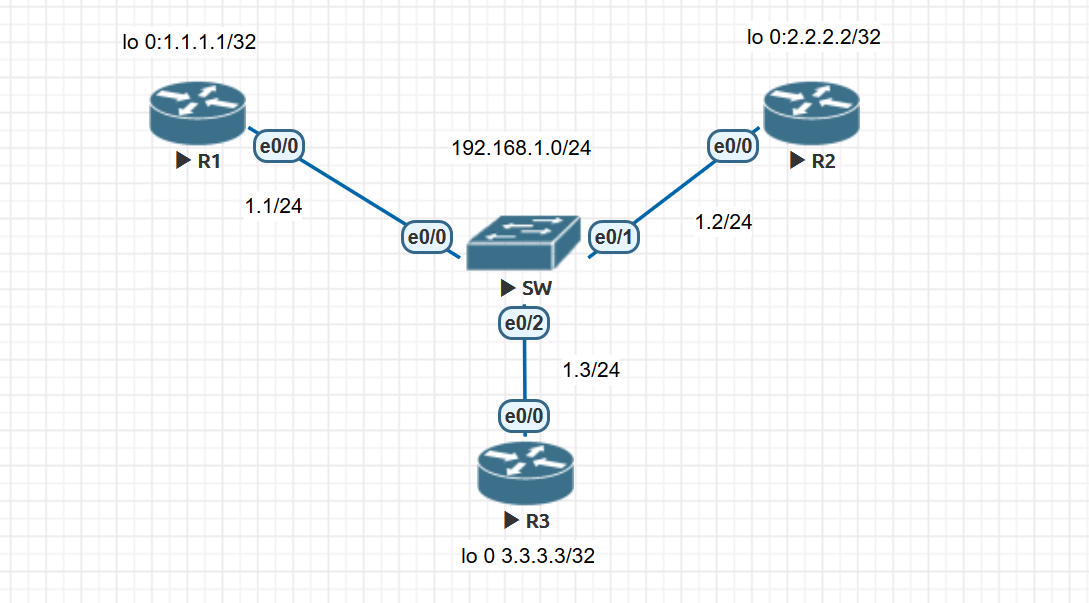
3.1. PIM SSM on IOS
Bring up the links and establish IGP reachability. The switches in this part forward within one VLAN. The Loopback0 command in the old excerpt needs a 255.255.255.255 mask.
router ospf 1
 router-id [loopback-port-IP]
 network 0.0.0.0 255.255.255.255 area 0
inter loopback 0
 ip address 1.1.1.1
 ip pim sparse-mode
Enable PIM and IGMPv3 where required.
ip multicast-routing
ip pim ssm default

interface Ethernet0/0
 ip address 192.168.1.1 255.255.255.0
 ip pim sparse-mode
 ip igmp version 3
Join the group and specify the source.
R1:
interface Ethernet0/0
 ip igmp join-group 232.1.1.1 source 2.2.2.2
R3:
interface Ethernet0/0
 ip igmp join-group 232.1.1.1 source 2.2.2.2
Send test traffic from R2. R1 and R3 receive it in the saved test.
R2#ping 232.1.1.1 sou 2.2.2.2
Type escape sequence to abort.
Sending 1, 100-byte ICMP Echos to 232.1.1.1, timeout is 2 seconds:
Packet sent with a source address of 2.2.2.2

Reply to request 0 from 192.168.1.1, 1 ms
Reply to request 0 from 192.168.1.3, 1 ms
The saved multicast table contains the Auto-RP discovery group 224.0.1.40. That entry alone does not verify SSM. Check the specific (S,G) entry for the test traffic. An empty RP mapping also does not prove that the SSM path works.
R2#show ip mroute
IP Multicast Routing Table
Flags: D - Dense, S - Sparse, B - Bidir Group, s - SSM Group, C - Connected,
       L - Local, P - Pruned, R - RP-bit set, F - Register flag,
       T - SPT-bit set, J - Join SPT, M - MSDP created entry, E - Extranet,
       X - Proxy Join Timer Running, A - Candidate for MSDP Advertisement,
       U - URD, I - Received Source Specific Host Report,
       Z - Multicast Tunnel, z - MDT-data group sender,
       Y - Joined MDT-data group, y - Sending to MDT-data group,
       G - Received BGP C-Mroute, g - Sent BGP C-Mroute,
       N - Received BGP Shared-Tree Prune, n - BGP C-Mroute suppressed,
       Q - Received BGP S-A Route, q - Sent BGP S-A Route,
       V - RD & Vector, v - Vector, p - PIM Joins on route,
       x - VxLAN group
Outgoing interface flags: H - Hardware switched, A - Assert winner, p - PIM Join
 Timers: Uptime/Expires
 Interface state: Interface, Next-Hop or VCD, State/Mode

(*, 224.0.1.40), 00:18:30/00:02:31, RP 0.0.0.0, flags: DCL
  Incoming interface: Null, RPF nbr 0.0.0.0
  Outgoing interface list:
    Loopback0, Forward/Sparse, 00:18:28/00:02:31


R2#show ip pim rp map
PIM Group-to-RP Mappings

R2#
The test from R3 gets no reply from R1 because R1 joined the channel sourced by 2.2.2.2.
R3>en
R3#ping 232.1.1.1 sou lo 0
Type escape sequence to abort.
Sending 1, 100-byte ICMP Echos to 232.1.1.1, timeout is 2 seconds:
Packet sent with a source address of 3.3.3.3
.
R3#
3.2. PIM SSM on IOS XR
Set IGMPv3 explicitly on the receiver interface.
router igmp
 interface GigabitEthernet0/0/0/0
 !
 version 3
Join the group for the selected source.
router igmp
 interface GigabitEthernet0/0/0/0
  join-group 232.1.1.1 2.2.2.2
 !
 version 3
Test with traffic sourced by 2.2.2.2.
RP/0/0/CPU0:R2#ping 232.1.1.1 sou 2.2.2.2
Tue Jul  7 16:11:02.092 UTC
Type escape sequence to abort.
Sending 1, 100-byte ICMP Echos to 232.1.1.1, timeout is 2 seconds:

Reply to request 0 from 12.1.1.1, 1 ms
Reply to request 0 from 12.1.1.3, 1 ms
RP/0/0/CPU0:R2#ping 232.1.1.1 sou 100.100.100.100
Tue Jul  7 16:13:45.671 UTC
Type escape sequence to abort.
Sending 1, 100-byte ICMP Echos to 232.1.1.1, timeout is 2 seconds:
.
RP/0/0/CPU0:R2#
3.3. PIM SSM on NX-OS
The original lab has no NX-OS configuration for this section.