IPsec over GRE on H3C
This lab compares two ways to combine GRE and IPsec. With IPsec over GRE, the policy on the tunnel interface protects traffic that matches the ACL before GRE wraps it. Unmatched traffic can still cross the GRE tunnel without IPsec protection. The outer GRE header is outside that protection.
0. Lab environment
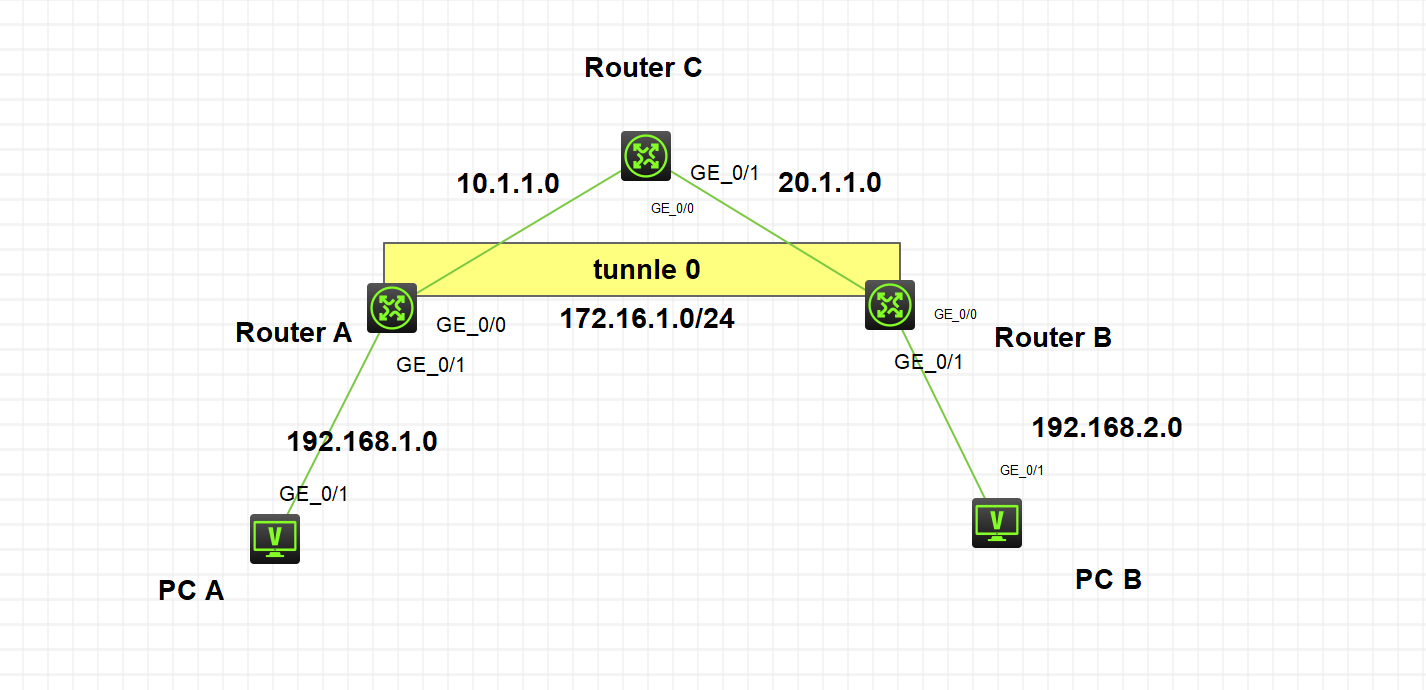
Routers A and B connect two LANs over a GRE tunnel. Router C represents the ISP. The lab uses H3C Cloud Lab with MSR36-20, version 7.1.075 Alpha 7571.
1. Base configuration
Use static routes so the tunnel endpoints can reach each other. Set each OSPF router ID from its loopback address. The OSPF adjacency will run over the tunnel.
Router A:
#
ospf 1 router-id 100.1.1.1
 area 0.0.0.0
#
interface LoopBack0
 ip address 100.1.1.1 255.255.255.0
 ospf 1 area 0.0.0.0
#
interface GigabitEthernet0/0
 port link-mode route
 ip address 10.1.1.2 255.255.255.0
#
interface GigabitEthernet0/1
 port link-mode route
 ip address 192.168.1.1 255.255.255.0
 ospf 1 area 0.0.0.0

#
 ip route-static 0.0.0.0 0 10.1.1.1
#
Router C:
#
interface GigabitEthernet0/0
 port link-mode route
 ip address 10.1.1.1 255.255.255.0
#
interface GigabitEthernet0/1
 port link-mode route
 ip address 20.1.1.1 255.255.255.0

#
Router B:
#
ospf 1 router-id 200.1.1.1
 area 0.0.0.0
#
interface LoopBack0
 ip address 200.1.1.1 255.255.255.0
 ospf 1 area 0.0.0.0
#
interface GigabitEthernet0/0
 port link-mode route
 ip address 20.1.1.2 255.255.255.0
#
interface GigabitEthernet0/1
 port link-mode route
 ip address 192.168.2.1 255.255.255.0
 ospf 1 area 0.0.0.0

#
 ip route-static 0.0.0.0 0 20.1.1.1
#
2. Configure the GRE tunnel
Create a GRE tunnel on A and B. Set the source to the local WAN address and the destination to the remote WAN address. Use the point-to-point OSPF network type on the tunnel.
Router A:
interface Tunnel0 mode gre
 ip address 172.16.1.1 255.255.255.0
 ospf network-type p2p
 ospf 1 area 0.0.0.0
 source 10.1.1.2
 destination 20.1.1.2
Router B:
interface Tunnel0 mode gre
 ip address 172.16.1.2 255.255.255.0
 ospf network-type p2p
 ospf 1 area 0.0.0.0
 source 20.1.1.2
 destination 10.1.1.2
3. Configure IPsec
Use an ACL on each router to match the traffic to protect. Check that the two sides agree on the algorithms and pre-shared key. Match the ACL direction and peer address to each router. This Comware 7 example configures the key in an IKE keychain.
The commands retain the original lab’s 3DES, MD5, and example key. For a new deployment, choose supported algorithms and credentials that meet the current security requirements.
Router A:
acl advanced 3000
 rule 0 permit ip source 192.168.1.0 0.0.0.255 destination 192.168.2.0 0.0.0.255
 rule 5 permit ip source 192.168.2.0 0.0.0.255 destination 192.168.1.0 0.0.0.255

#
ipsec transform-set 123
 esp encryption-algorithm 3des-cbc
 esp authentication-algorithm md5
#
ipsec policy 123 1 isakmp
 transform-set 123
 security acl 3000
 remote-address 172.16.1.2
#
ike keychain 1
 pre-shared-key address 172.16.1.2 255.255.255.255 key simply 123
Router B:
acl advanced 3000
 rule 0 permit ip source 192.168.1.0 0.0.0.255 destination 192.168.2.0 0.0.0.255
 rule 5 permit ip source 192.168.2.0 0.0.0.255 destination 192.168.1.0 0.0.0.255

#
ipsec transform-set 123
 esp encryption-algorithm 3des-cbc
 esp authentication-algorithm md5
#
ipsec policy 123 1 isakmp
 transform-set 123
 security acl 3000
 remote-address 172.16.1.1
#
ike keychain 1
 pre-shared-key address 172.16.1.1 255.255.255.255 key simply 123
4. Apply the IPsec policy
Apply the policy to the tunnel interface on both routers.
interface Tunnel0 mode gre
 ipsec apply policy 123
5. Verify traffic protection
Ping across the tunnel. An early probe may time out while IKE negotiates. A successful ping confirms reachability. Check the IKE and IPsec security associations (SAs), packet counters, and a capture on the outside link to confirm that the traffic is protected.
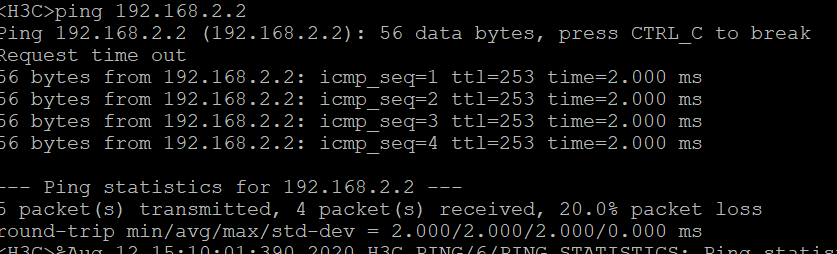
Traffic matching the ACL triggers negotiation. The saved output shows the IKE SA.
<H3C>display ike sa
    Connection-ID   Remote                Flag         DOI
------------------------------------------------------------------
    1               172.16.1.1            RD           IPsec
Flags:
RD--READY RL--REPLACED FD-FADING RK-REKEY
Check the IPsec SA next.
<H3C>display ipsec sa
-------------------------------
Interface: Tunnel0
-------------------------------

  -----------------------------
  IPsec policy: 123
  Sequence number: 1
  Mode: ISAKMP
  -----------------------------
    Tunnel id: 0
    Encapsulation mode: tunnel
    Perfect Forward Secrecy:
    Inside VPN:
    Extended Sequence Numbers enable: N
    Traffic Flow Confidentiality enable: N
    Path MTU: 1420
    Tunnel:
        local  address: 172.16.1.2
        remote address: 172.16.1.1
    Flow:
        sour addr: 192.168.2.0/255.255.255.0  port: 0  protocol: ip
        dest addr: 192.168.1.0/255.255.255.0  port: 0  protocol: ip

    [Inbound ESP SAs]
      SPI: 1503174692 (0x5998a024)
      Connection ID: 30064771075
      Transform set: ESP-ENCRYPT-3DES-CBC ESP-AUTH-MD5
      SA duration (kilobytes/sec): 1843200/3600
      SA remaining duration (kilobytes/sec): 1843199/3316
      Max received sequence-number: 4
      Anti-replay check enable: Y
      Anti-replay window size: 64
      UDP encapsulation used for NAT traversal: N
      Status: Active

    [Outbound ESP SAs]
      SPI: 3411111458 (0xcb516e22)
      Connection ID: 30064771074
      Transform set: ESP-ENCRYPT-3DES-CBC ESP-AUTH-MD5
      SA duration (kilobytes/sec): 1843200/3600
      SA remaining duration (kilobytes/sec): 1843199/3316
      Max sent sequence-number: 4
      UDP encapsulation used for NAT traversal: N
      Status: Active
The GRE interface output shows that keepalives are disabled. Use traffic tests and SA counters to verify the path.
[H3C]display interface tunnel0
Tunnel0
Current state: UP
Line protocol state: UP
Description: Tunnel0 Interface
Bandwidth: 64 kbps
Maximum transmission unit: 1476
Internet address: 172.16.1.2/24 (primary)
Tunnel source 20.1.1.2, destination 10.1.1.2
Tunnel keepalive disabled
Tunnel TTL 255
Tunnel protocol/transport GRE/IP
    GRE key disabled
    Checksumming of GRE packets disabled
Output queue - Urgent queuing: Size/Length/Discards 0/100/0
Output queue - Protocol queuing: Size/Length/Discards 0/500/0
Output queue - FIFO queuing: Size/Length/Discards 0/75/0
Last clearing of counters: Never
Last 300 seconds input rate: 18 bytes/sec, 144 bits/sec, 0 packets/sec
Last 300 seconds output rate: 18 bytes/sec, 144 bits/sec, 0 packets/sec
Input: 1711 packets, 122752 bytes, 0 drops
Output: 1699 packets, 120360 bytes, 0 drops
Before applying IPsec, the capture shows GRE with ICMP inside.

With the tunnel policy in place, the outer GRE header remains visible. ESP sits inside GRE for the traffic matched by the policy. OSPF and other traffic outside the ACL can still pass through GRE without that protection.

6. Switch to GRE over IPsec
This time, GRE wraps the original packet first. The policy on the physical egress interface then protects the GRE packet. When the ACL matches the GRE traffic, this also protects routing traffic carried inside the tunnel.
IPsec tunnel mode adds an outer IP header. Transport mode can reduce the overhead in suitable designs. Check the actual packet size, path MTU, and fragmentation behavior in either case. The recorded SA shows tunnel mode.
Move the policy from Tunnel0 to the physical egress interfaces and set the peer addresses to the WAN endpoints. Remove the old ACL rules and verify that the SAs form again. The example uses an IP match between the endpoints, which can also match traffic other than GRE. Use a GRE-specific match if that is the intended scope.
6.1. Configuration changes
Router A:
acl advanced 3000
 rule 0 permit ip source 10.1.1.2 32 destination 20.1.1.2 32
#
ipsec transform-set 123
 esp encryption-algorithm 3des-cbc
 esp authentication-algorithm md5
#
ipsec policy 123 1 isakmp
 transform-set 123
 security acl 3000
 remote-address 20.1.1.2
#
ike keychain 1
 pre-shared-key address 20.1.1.2 255.255.255.255 key simply 123
#
interface GigabitEthernet0/0
ipsec apply policy 123
Router B:
acl advanced 3000
 rule 0 permit ip source 20.1.1.2 32 destination 10.1.1.2 32
#
ipsec transform-set 123
 esp encryption-algorithm 3des-cbc
 esp authentication-algorithm md5
#
ipsec policy 123 1 isakmp
 transform-set 123
 security acl 3000
 remote-address 10.1.1.2
#
ike keychain 1
 pre-shared-key address 10.1.1.2 255.255.255.255 key simply 123
#
interface GigabitEthernet0/0
ipsec apply policy 123
6.2. Verify the result
The configuration above uses Router B’s peer address from the topology. The outputs below are from the original run. When repeating the lab, check both peers’ SAs, packet counters, and capture again.
[H3C]dis ike sa
    Connection-ID   Remote                Flag         DOI
------------------------------------------------------------------
    10              20.1.1.2              RD           IPsec
Flags:
RD--READY RL--REPLACED FD-FADING RK-REKEY
[H3C]dis ipsec sa
-------------------------------
Interface: GigabitEthernet0/0
-------------------------------

  -----------------------------
  IPsec policy: 123
  Sequence number: 1
  Mode: ISAKMP
  -----------------------------
    Tunnel id: 0
    Encapsulation mode: tunnel
    Perfect Forward Secrecy:
    Inside VPN:
    Extended Sequence Numbers enable: N
    Traffic Flow Confidentiality enable: N
    Path MTU: 1444
    Tunnel:
        local  address: 10.1.1.2
        remote address: 20.1.1.2
    Flow:
        sour addr: 10.1.1.2/255.255.255.255  port: 0  protocol: ip
        dest addr: 20.1.1.2/255.255.255.255  port: 0  protocol: ip

    [Inbound ESP SAs]
      SPI: 3221028236 (0xbffcfd8c)
      Connection ID: 98784247808
      Transform set: ESP-ENCRYPT-3DES-CBC ESP-AUTH-MD5
      SA duration (kilobytes/sec): 1843200/3600
      SA remaining duration (kilobytes/sec): 1843199/3419
      Max received sequence-number: 9
      Anti-replay check enable: Y
      Anti-replay window size: 64
      UDP encapsulation used for NAT traversal: N
      Status: Active

    [Outbound ESP SAs]
      SPI: 3175456113 (0xbd459d71)
      Connection ID: 193273528321
      Transform set: ESP-ENCRYPT-3DES-CBC ESP-AUTH-MD5
      SA duration (kilobytes/sec): 1843200/3600
      SA remaining duration (kilobytes/sec): 1843198/3419
      Max sent sequence-number: 10
      UDP encapsulation used for NAT traversal: N
      Status: Active

  -----------------------------
  IPsec policy: 123
  Sequence number: 1
  Mode: ISAKMP
  -----------------------------
    Tunnel id: 0
    Encapsulation mode: tunnel
    Perfect Forward Secrecy:
    Inside VPN:
    Extended Sequence Numbers enable: N
    Traffic Flow Confidentiality enable: N
    Path MTU: 1444
    Tunnel:
        local  address: 10.1.1.2
        remote address: 20.1.1.2
    Flow:
        sour addr: 10.1.1.2/255.255.255.255  port: 0  protocol: ip
        dest addr: 20.1.1.2/255.255.255.255  port: 0  protocol: ip

    [Inbound ESP SAs]
      SPI: 2902764455 (0xad04aba7)
      Connection ID: 12884901891
      Transform set: ESP-ENCRYPT-3DES-CBC ESP-AUTH-MD5
      SA duration (kilobytes/sec): 1843200/3600
      SA remaining duration (kilobytes/sec): 1843197/3469
      Max received sequence-number: 28
      Anti-replay check enable: Y
      Anti-replay window size: 64
      UDP encapsulation used for NAT traversal: N
      Status: Active

    [Outbound ESP SAs]
      SPI: 2962522711 (0xb0948257)
      Connection ID: 12884901890
      Transform set: ESP-ENCRYPT-3DES-CBC ESP-AUTH-MD5
      SA duration (kilobytes/sec): 1843200/3600
      SA remaining duration (kilobytes/sec): 1843196/3469
      Max sent sequence-number: 30
      UDP encapsulation used for NAT traversal: N
      Status: Active
The final capture shows the outer addresses and ESP. The protected inner packet is no longer readable from the outside link.

